 KinPing
How most daily check-in apps work
Search for a daily check in app and you will find many that share one design. The person being checked on installs an app. Once a day, often at a fixed time, they open it and press a button that says something like "I'm OK". If they do not press it by a deadline, the app sends an alert to a family member or an emergency contact, by text, by call, or to a monitoring center.
This model has real strengths. It is clear. It does not depend on anyone remembering to ask. For someone at genuine risk who lives alone, an escalation chain can be exactly what is needed.
It also has weaknesses. The person being checked on carries all the work: they must remember to press the button every day. The person being alerted carries all the worry: a missed press becomes a jolt of fear, and often the phone was just off. False alarms wear people down.
How KinPing is different
KinPing is a family check-in app that starts from the opposite direction. Instead of a button the person has to remember to press, there is a question that someone who cares sends to them.
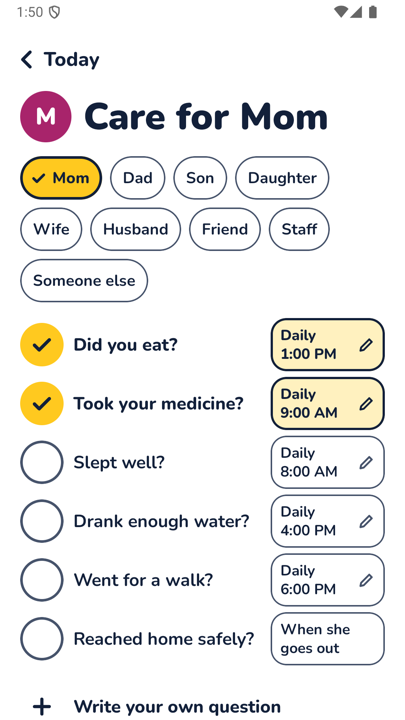
A question, not a button. You choose a question from a ready-made list for mom, dad, son, daughter, wife, husband, friend or staff, or you write your own. "Did you eat?" "Took your medicine?" "Reached home safely?" It arrives with your name and face at the top, so answering feels like replying to family.
One tap to answer. Yes, Not yet, or Later. A note or a photo is optional.
No alarms. If a question goes unanswered, you see "No answer yet" on your Today screen. The person sees a reminder for the question waiting for them. Nothing escalates automatically. You decide what to do next.
No GPS tracking and no hidden mode. KinPing never knows where anyone is. Every question is visible to the person answering before it starts.
Both sides choose. Both people must agree to connect. The person answering approves each question once. Either side can pause, leave, report or block at any time.
Answer from a link, no app needed. The question can arrive as a link in WhatsApp or SMS and opens in the browser on any phone.
Time zones handled, and free. A question set for 1:00 PM arrives at 1:00 PM where the other person is. KinPing is free with a small Google banner ad.
The setup screen shows this at a glance: pill buttons for who the person is, then ready-made questions with a daily time next to each, plus "Write your own question". Each person's page keeps up to 14 days of history.
What KinPing does not do
This is the honest part, and it matters when choosing.
- KinPing does not send alerts. No text to a contact, no call, no monitoring center. If you want an escalation chain when a button is missed, KinPing is not that product.
- KinPing is not an emergency service. A missing answer may just mean a phone is off, a battery died, or someone is asleep. If you are worried about someone's safety, call them, call a neighbor, or call local emergency services.
- KinPing does not track location. If you want to see where a family member is, you need a different kind of app.
- KinPing is not a medical alert device. It cannot call for help.
Which one fits you
Choose an alarm-style daily check-in app if the person you care about is at real risk living alone and you want an automatic escalation when they do not respond.
Choose KinPing if what you want is the everyday knowing: that Mom ate, that Dad took his pills, that your daughter reached home. If you want it to feel like family rather than monitoring, with no map, no alarms, and nothing to remember, KinPing is built for that. Some families use both.
Getting started
Sign in with Google or Apple. Your email is never shown to connections. Ages 13 and up. Android is in closed testing on Google Play. Open the tester link on an Android phone and tap "Become a tester". iPhone is coming soon.
Read how it works, or see KinPing for aging parents, people who live alone and long distance family.
Updated 2026-11-05.