 KinPing
The "reached home safely" message
Every parent with a child in another city or country knows the message. "Reached home safely?" You send it at what you think is their evening. They see it at breakfast. They mean to answer, then class starts, then work, then it is their evening and your night, and the thread goes quiet. You lie awake doing time zone math and telling yourself it is fine.
It usually is fine. But an unanswered message is a small weight that parents carry constantly, and children feel guilty about constantly. KinPing is a family check-in app built to take that weight off both sides.
One question, one tap, their time zone
Here is how it works for a daughter studying abroad, or a son who moved to another city for work.
- You connect in the app. Both of you choose to connect.
- You pick a question. "Reached home safely?" is ready-made for sons and daughters, along with "Did you eat?" and "Slept well?". You can also write your own, like "How was the exam?"
- You set a time in their day. A question set for 11:00 PM arrives at 11:00 PM where they are, not where you are.
- They approve the question once.
- Each day it arrives with your face and "Mom asks" or "Dad asks" at the top. They tap Yes, Not yet or Later. It takes a moment between lectures or on the train home.
- You see the answer on your Today screen with the time they tapped.
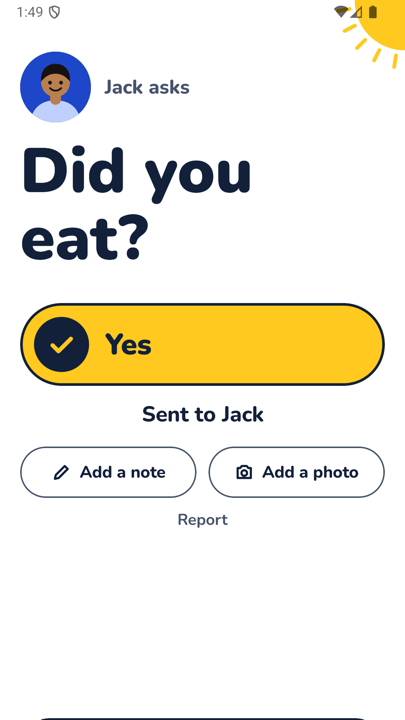
When they tap Yes, the button fills in yellow and the screen says "Sent to Mom". If they want to add more, there is "Add a note" and "Add a photo" right there. A photo of a messy dorm desk or a line like "long day, pizza for dinner" is often more than you would get from a phone call.
Built for busy adult kids, not for nagging
Young adults away from home do not want to be tracked, and they do not want to feel managed.
- No GPS tracking. You never see where they are. There is no map.
- No alarms. If they miss a day, you see "No answer yet". Nothing goes off on either phone.
- No hidden mode. They see every question before it starts and approve it. They can pause the questions themselves from the answer screen, for example during exam week, and they can leave at any time.
- No "I'm OK" button to forget. The question comes to them. They do not have to remember to open an app and report in.
They do not even need the app
If your child does not want another app on their phone, the question can arrive as a link in WhatsApp or SMS. It opens in the browser, they tap Yes, and you see it in KinPing. Each person's page keeps up to 14 days of history. If a question is still waiting, they see a reminder for it.
A note on safety
KinPing is not an emergency service. A missing answer may just mean a phone is off, a battery died, or they fell asleep with the phone on silent. If you are genuinely worried about your child's safety, call them, call a roommate, or contact local emergency services where they live. KinPing is for the everyday "yes, I'm home" that lets you sleep.
Free and private
KinPing is free with a small Google banner ad. Nothing is paid. You sign in with Google or Apple, your email is never shown to your connections, and you can delete your account from Settings. Ages 13 and up.
Android is in closed testing on Google Play. Open the tester link on an Android phone and tap "Become a tester". iPhone is coming soon.
Read how it works, or see KinPing for long distance family and aging parents.
Updated 2026-11-05.