 KinPing
Living alone and the daily question
A daily check in app for people who live alone should do one thing well: let someone who cares know you are fine, without making you feel watched. That is what KinPing is for.
Living alone is normal and often a choice. But it comes with a small gap. If your mother lives alone across the country, how do you know she ate today without calling three times? The usual answers are heavy. A medical pendant feels like giving up. A location app feels like a leash. A daily phone call becomes a chore for both sides and gets skipped on busy days.
KinPing is a lighter living alone app. One person asks a small question. The other taps an answer. That is the whole routine.
How the day goes with KinPing
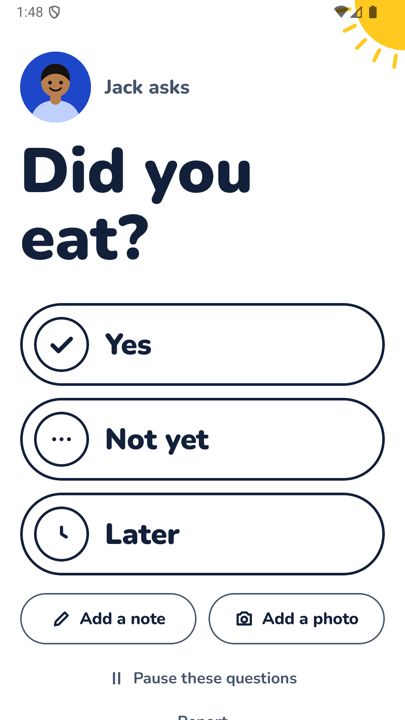
Say your son Jack sets up "Did you eat?" for 1:00 PM. At 1:00 PM, in your time zone, your phone shows a screen with his face at the top and "Jack asks" above the question in big friendly type. Below it are three large buttons: Yes, Not yet, and Later. You tap one. Done.
If you want to say more, there is "Add a note" and "Add a photo" under the buttons. A photo of your lunch, a note that says "soup today". Entirely optional.
Jack sees your answer on his Today screen, with the time you tapped. If you have not answered he sees "No answer yet". You see a reminder for the question waiting for you. No siren, no red banner.
The question screen also has "Pause these questions" at the bottom. If you are traveling, or just want a quiet weekend, you pause them yourself. You are in charge of your own check-in.
For seniors who do not want another app
KinPing works as a check in app for seniors because the senior does not have to install anything. The question can arrive as a link in WhatsApp or SMS. Tap the link, it opens in the browser, tap Yes. No app to install and no app icon to hunt for.
What KinPing does not do
- No GPS tracking. Nobody sees where you are. The app never asks for your location.
- No alarms. A missed tap does not call anyone. It just shows as "No answer yet" to the person who asked.
- No "I'm OK" button to forget. The question comes to you, at the time your family chose, with their name on it.
- No hidden mode. You approve each question once before it starts. You can pause, leave, report or block at any time, and so can they.
KinPing is not an emergency service. A missing answer may just mean a phone is off or a nap ran long. If you need a service that sends help when you cannot respond, you need a different kind of product. KinPing is for the everyday "yes, I ate, yes, I took my pills" that keeps families close.
Free check in app for elderly family, with nothing to buy
People searching for a free check in app for elderly parents often want to know what the catch is. There is none. KinPing is free. There is a small Google banner ad in the app and nothing is paid.
You sign in with Google or Apple. Your email is never shown to the people you connect with. If you decide to stop, you delete your account from Settings. Ages 13 and up.
Getting started
Android is in closed testing on Google Play. On an Android phone, open the tester link and tap "Become a tester". iPhone is coming soon. Because answers work from a link, the person who lives alone can be on any phone.
See the full flow on how it works, or read about KinPing for aging parents and long distance family.
Updated 2026-11-05.