 KinPing
Is there an app for caregivers that does not get in the way?
Families who hire help often ask the same thing: is there an app for caregivers that is simple enough for everyone to actually use? You do not need shift scheduling, invoicing or a care plan dashboard. You need to know, each day, that one thing happened. Did Mom get her medicine? Was the site visit done? Did the evening caregiver come?
KinPing is a caregiver check in app in the narrowest, most useful sense. The family asks one question. The caregiver taps one answer. You see the answers, with up to 14 days of history.
How it works with a caregiver or staff member
KinPing includes a Staff relationship alongside mom, dad, son, daughter, wife, husband and friend. When you set up a connection with a caregiver, you choose Staff and pick or write the questions that matter.
- A home caregiver for an elderly parent. "Gave Mom her medicine?" at 9:00 AM. "Did Dad eat lunch?" at 1:30 PM.
- A housekeeper, driver or nanny. "Site visit done?" "Picked up the groceries?" "Nap happened?"
The caregiver approves each question once. After that it arrives at the time you set, in their time zone, with your name on it. They tap Yes, Not yet or Later. If something needs explaining, they can add a note or a photo. A photo of the medicine box or the finished job is often all the proof a family needs.
On the family's Today screen, the staff member appears with the "(Staff)" label next to their name. In the demo, "Sam (Staff): Site visit done? Yes, 11:05 AM" sits under the entries for Mom and Jack. One screen, everyone who matters, who has answered and who has not.
The person page and 14 days of history
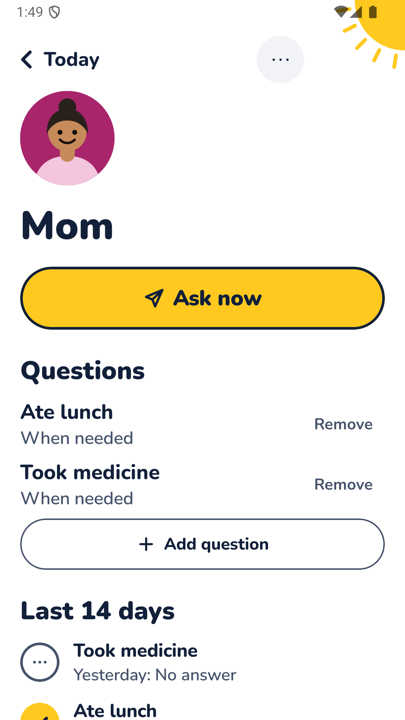
Tap any name and you get that person's page. At the top is their avatar and an "Ask now" button to send a question immediately, for instance if a visit was moved to today. Below that is the list of questions you have set for them, each with a Remove link, plus "Add question".
Then comes "Last 14 days": each question and each answer, with a tick for Yes and the time, or "No answer" for days when nothing came back. This is where a caregiver check in app earns its place.
No app needed for staff
Many caregivers and household staff do not want an employer's app on their personal phone. KinPing does not require it. The question can arrive as a link in WhatsApp or SMS. It opens in the browser, they tap their answer, and you see it in KinPing.
Respectful by design
KinPing treats staff the same way it treats family.
- Both sides choose. The caregiver has to accept the connection.
- Approve once. Every question is approved by the person answering before it starts.
- No GPS tracking. The app never knows where the caregiver is. There is no map and no hidden mode.
- No alarms. A missed answer shows as "No answer yet". There is no alert and no automatic escalation.
- Pause, leave, report or block. Either side can do any of these at any time.
What KinPing is not
KinPing is not an emergency service, a medical record, or a timesheet. A missing answer may just mean a phone is off or a shift ran late. If you are worried about a vulnerable person's immediate safety, call them or local emergency services. KinPing answers the smaller, daily question: did the thing happen today?
Free and private
KinPing is free with a small Google banner ad. Nothing is paid, so there is no fee for adding a caregiver. Sign in with Google or Apple. Your email is never shown to the people you connect with, including staff, and you can delete your account from Settings. Ages 13 and up.
Android is in closed testing on Google Play. Open the tester link on an Android phone and tap "Become a tester". iPhone is coming soon.
See how it works, or read about KinPing for aging parents.
Updated 2026-11-05.