 KinPing
Why checking on elderly parents gets hard
If you are looking for an app to check on elderly parents, you know the feeling. You call, and the line is busy. You text, and the reply comes six hours later. You wonder whether Dad took his pills or whether Mom ate before noon. Checking on elderly parents from another town, or another country, turns into a quiet worry that never fully goes away.
The usual tools do not fit. A phone call every day can feel like an interrogation to a proud parent. A location app feels like surveillance. A family group chat buries the one thing you wanted to know.
KinPing is an aging parents app built for exactly this gap. It is small on purpose.
How KinPing works for parents
You pick a question. They answer it with one tap.
- You connect with your parent in the app. Both of you choose to connect.
- You choose a question from the ready-made list for Mom or Dad, or write your own. Examples: Did you eat? Took your medicine? Went for a walk? Slept well?
- You set a time. A question set for 1:00 PM arrives at 1:00 PM where your parent is, even in a different time zone.
- Your parent approves the question once. After that it simply arrives each day.
- They answer with one tap: Yes, Not yet, or Later. They can add a short note or a photo if they like.
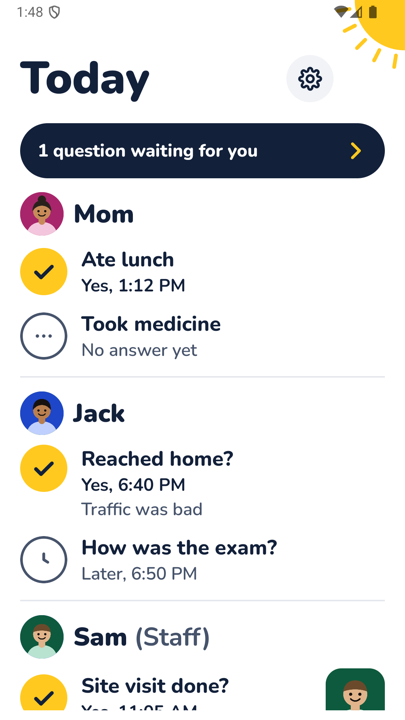
- You see the answer on your Today screen.
The Today screen lists each person you check on, with their questions underneath. A tick and a time mean answered. A quiet "No answer yet" means not yet. One glance tells you who has answered and who is still to come.
What makes it different from other apps for elderly parents
Most apps for elderly parents either track location, so you see a dot on a map, or give your parent a button to press every day to say "I'm OK" and alert you if they forget. KinPing does neither.
- No GPS tracking. The app never knows where your parent is. It only knows whether they tapped Yes.
- No alarms. A missed answer does not set off anything. You see "No answer yet" and decide what to do, which is usually a normal phone call.
- No "I'm OK" button to forget. The question comes to them, from you, with your name on it. Answering feels like replying to family.
- No hidden mode. Your parent sees every question and approves it before it starts. They can pause, leave, report or block at any time. So can you.
- No app needed on their side. The question can arrive as a link in WhatsApp or SMS and opens in the browser. They tap Yes there and you see it in KinPing.
If a question is still waiting, your parent sees a reminder for it. Each person's page keeps up to 14 days of history.
Honest limits
KinPing is not an emergency service or a medical alert device. A missing answer may just mean a phone is off, a battery has died, or someone is napping. If you are worried about a parent's safety, call them, call a neighbor, or call local emergency services.
Cost and getting started
KinPing is free with a small Google banner ad. Nothing is paid. You sign in with Google or Apple, your email is never shown to the people you connect with, and you can delete your account from Settings. Ages 13 and up.
Android is in closed testing on Google Play. Open the tester link on an Android phone and tap "Become a tester". iPhone is coming soon. Your parent does not need the app to answer, so you can start today whatever phone they have.
Read how it works, or see how KinPing compares with other daily check-in apps.
Updated 2026-11-05.