 KinPing
"Reached home safely?" is the text families send every evening, to a daughter on the late train, a husband driving back from a site, a parent returning from the shops. KinPing turns that daily message into a check-in question that goes out at a set time and is answered with one tap.
Why families ask this question
The hour between "left" and "home" is the one families worry about most. The question is not nosy. It asks about one moment, arrival, and once the answer is "Yes" the worry is over for the day.
The problem with the daily text is that it depends on memory. The person at home forgets to ask, or asks too early. The person traveling forgets to reply. A fixed question at a fixed time takes the remembering out of it.
Ready-to-send "reached home safely" messages
If you still want to type it yourself tonight, here are a few short versions that feel like care rather than checking up:
- "Reached home safely? Just let me know when you are in."
- "Home yet? One word is fine."
- "Did you reach home safely? No rush, just thinking of you."
- "Let me know when you are back. Sleep well."
A KinPing question replaces this daily text. Set "Reached home safely?" once, and it arrives on its own at the time they are usually back. They tap Yes, Not yet or Later, and you see it on your Today screen without opening a chat.
Who asks whom
- A parent asking a son or daughter who travels home late from work or college.
- A wife or husband asking a partner who drives long distances.
- A son or daughter asking a parent who goes out on their own.
Both people choose to connect, the person answering approves the question once, and either side can pause, leave, report or block at any time.
How KinPing sends it
In the ready-made list this question is set to "When she goes out" rather than a fixed hour. You can also give it a daily time, for example 7:00 PM, and it arrives at 7:00 PM in their time zone.
If they have the app, the question appears there. If they do not, it arrives as a link in WhatsApp or SMS and opens in the browser. The answer is one tap: Yes, Not yet or Later. A note such as "traffic was bad" is optional.
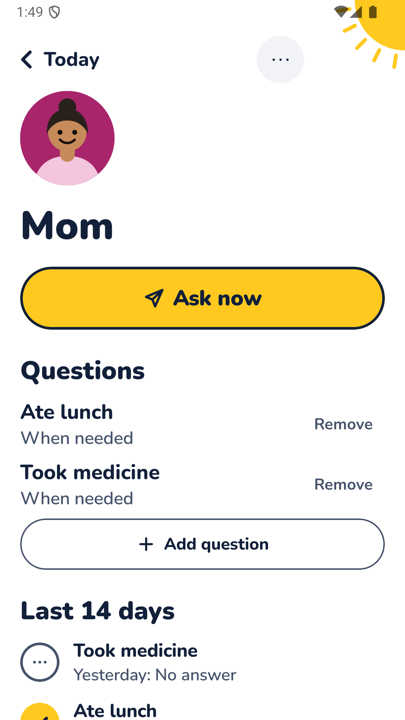
On your Today screen the answer appears with a yellow tick and the time, as in the person view above. There are reminders for questions waiting for you. Up to 14 days of history per person is kept.
Setting it up in the app
- Add the person and pick a label such as Son, Daughter, Wife, Husband or Someone else.
- Tick Reached home safely? in the ready-made list.
- Keep "When she goes out," or tap the time and set a daily hour in their local time.
- They see "wants to check on you," turn the question on, and tap Accept.
Wording that feels like care
- Ask about arrival, not about where they have been. "Reached home safely?" rather than "Where are you?"
- Let "Not yet" be fine. It means they saw the question and are still on the way.
- Do not chase a "Later." They will answer when they are through the door.
One honest limit
KinPing is not an emergency service and not a safety alarm. A missing answer may just mean a phone is off or they fell asleep the moment they got in. There is no GPS tracking and no hidden mode. If you are genuinely worried, call them or call for help.
Browse the other ready-made questions on daily check-in questions for family or read how it works.
Updated 2026-11-05.