 KinPing
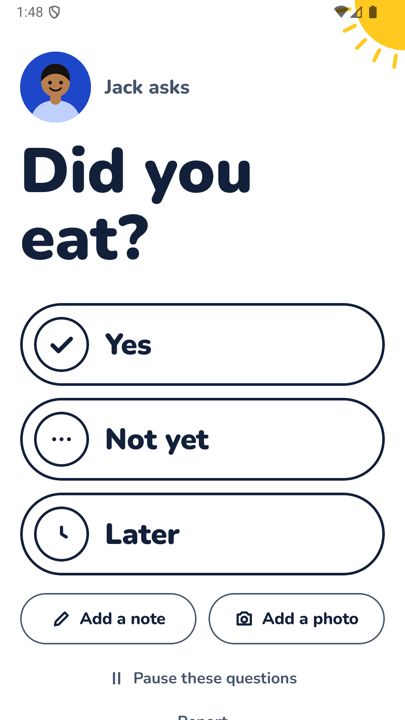
"Did you eat?" is probably the first thing your mother ever asked when you called home. It is also the question grown children most want to ask back, especially when a parent lives alone. KinPing turns it into a daily check-in question that takes one tap to answer.
Why families ask this question
Eating is the simplest everyday sign that someone is doing fine. A parent who ate lunch has got up, moved around, and made something. It is a small thing, and small things are what you miss from far away.
It is also a question people are happy to answer. "Did you eat?" does not pry. It asks about a plate of food, and a plate of food is easy to say yes to.
Who asks whom
- A son or daughter checking on a mother or father who lives alone.
- A husband or wife away for work, asking a partner who skips meals.
- A parent asking a student son or daughter in a new city.
The person asking picks the question, and the person answering approves it once. Either side can pause or leave at any time.
How KinPing sends it
You set a time, for example daily at 1:00 PM. The question arrives at 1:00 PM in the other person's time zone, not yours. If they have the app, it shows up there. If they do not, it arrives as a link in WhatsApp or SMS that opens in the browser, with nothing to install.
The answer screen is shown above. The question sits in large type, then three big buttons: Yes, Not yet, Later. Below them, Add a note and Add a photo are optional. A photo of lunch is a lovely answer.
On your side, the Today screen shows a yellow tick and the time, or an empty circle if there is no answer yet. There are reminders for questions waiting for you, and up to 14 days of history per person.
Setting it up in the app
- Add the person and choose a label such as Mom, Dad, Wife, Husband or Someone else.
- Tick Did you eat? in the ready-made list.
- Tap the time and set when it should arrive, in their local time.
- They see "wants to check on you" with the question and a switch, and tap Accept.
From then on it goes out every day on its own. For a second meal, write your own question such as "Did you have dinner?" with its own time.
Wording that feels like care
The ready-made question is deliberately short. If you write your own:
- Keep it about today, not about habits. "Did you eat?" rather than "Are you eating properly?"
- Leave room for "Not yet." That answer is useful and should not feel like a failure.
- Reply to the note or photo now and then. A "looks good" back makes it a conversation, not a report.
If a parent is sensitive about being checked on, tell them why before the first question. "I just like knowing you had lunch" goes a long way. The approval screen helps too, because they see exactly what they are agreeing to.
What it is not
KinPing is not a diet tracker. It records the answer they chose, plus a note or photo if they added one. There is no GPS tracking and no hidden mode. It is not an emergency service. A missing answer may just mean a phone is off, so if you are worried, call.
You can see the other ready-made questions on daily check-in questions for family or read the full flow on how it works.
Updated 2026-11-05.